Discover the Art of Cutting-Edge Designs
Explore advanced beginner courses in HTML for a deeper understanding. Learn dynamic content, forms, CSS integration, and responsive design.
Dear learners, Are you interested in assessing your progress?
Request your mentor to give you access and start your Test.
Welcome to the next level of HTML proficiency! As an advanced beginner, you’ve conquered the basics; now it’s time to elevate your skills. HTML (Hypertext Markup Language) remains the backbone of web development, and with advanced techniques, you can craft more sophisticated and dynamic web pages.
Learn HTML Advanced Basic Tags
1.Time for some styling
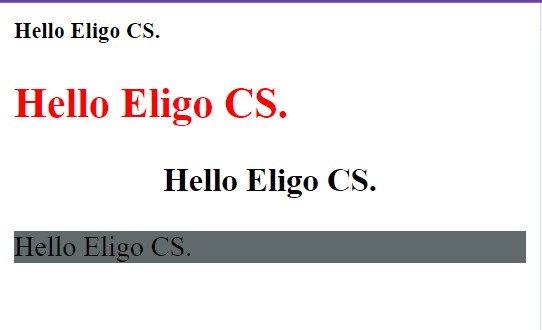
The <style> tag is used to declare style information (CSS) for a document. It is where the developer can define the appearance and layout of the website or page, including font styles, colors, and spacing.
HTML
<!DOCTYPE html>
<html>
<head>
<title>
HTML Style Tag | Set Font Size
</title>
</head>
<body>
<h1 style="font-size:80%;"> Hello Eligo CS. </h1>
<h2 style=" color:red;">
Hello Eligo CS.
</h2>
<h3 style=" text-align:center;">
Hello Eligo CS.
</h3>
<p style=" background-color:#616A6B;">
Hello Eligo CS.
</p>
<font size="6" face="verdana" color="green"> </font>
</body>
</html>
HTML
2. Text alignment :
HTML is used by the browser to manipulate text, images, and other content to display it in the required format.
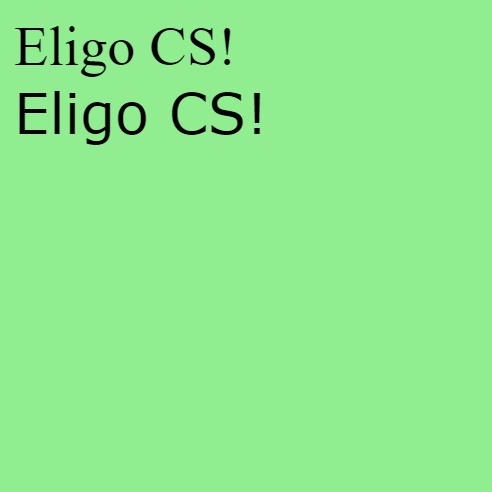
- HTML provides various styles and attributes to make changes to the documents as per the user’s needs. Following is an HTML code that shows the use of bgcolor attribute
HTML
<!DOCTYPE html>
<html>
<body bgcolor="lightgreen" >
<font face="Times New Roman" size="6">
Eligo CS!
</font> <br />
<font face="Verdana" size="6">
Eligo CS!
</font>
</body>
</html>
HTML
3. List /list style/list inside list :
The List can be used to store the information in short, either in bulleted form or numbered format, that visually help to look at a glance.
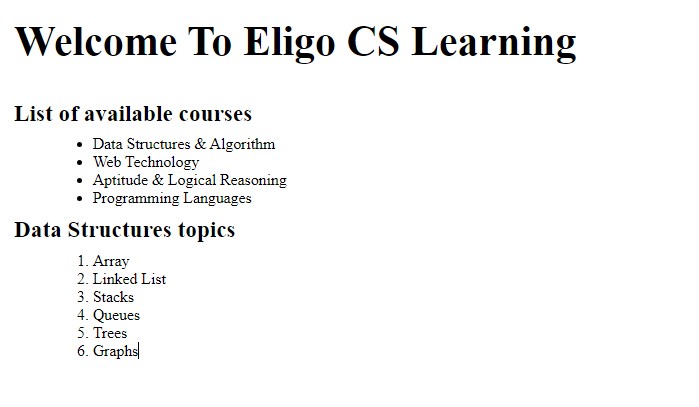
Unordered List: An Unordered list is used to create a list of related items, in bulleted or unordered format. It starts with the <ul> tag, followed by the <li> tag to show list items inside <ul> tag.
Ordered Lists: The Ordered lists have an order which is either numerical or alphabetical. The <ol> tag is used to create ordered lists in HTML and just like unordered list, we use <li> tag to define or show lists inside <ol> tag.
HTML
<!DOCTYPE html>
<html>
<head>
<title> Eligo Creative Services</title> </head>
<body>
<h2> Welcome To Eligo CS Learning</h2>
<h5> List of available courses</h5>
<ul>
<li> Data Structures & Algorithm</li>
<li> Web Technology</li>
<li> Aptitude & Logical Reasoning</li>
<li> Programming Languages</li>
</ul>
<h5> Data Structures topics</h5>
<ol>
<li> Array</li>
<li> Linked List</li>
<li> Stacks</li>
<li> Queues</li>
<li> Trees</li>
<li> Graphs</li>
</ol>
</body>
</html>
HTML
-
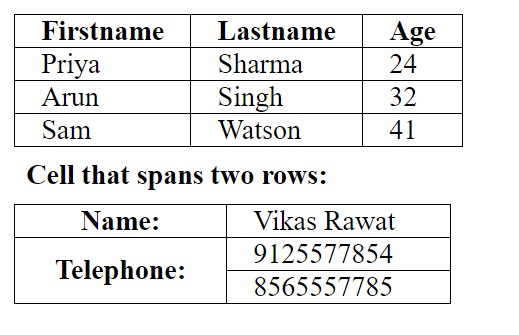
- We use the <table> tag, to create table in HTML. A table consist of rows and columns. Table heading, row and column and table data can be set using one or more <th>, <tr>, and <td> elements.
HTML
<!DOCTYPE html>
<html>
<head>
<style>
table,
th,
td {
border: 1px solid black;
border-collapse: collapse;
}
th,
td {
padding: 20px;
}
</style>
</head>
<body>
<table style="width:100%">
<tr>
<th> Firstname</th>
<th> Lastname</th>
<th> Age</th>
</tr>
<tr>
<td> Priya</td>
<td> Sharma</td>
<td> 24</td>
</tr>
<tr>
<td> Arun</td>
<td> Singh</td>
<td> 32</td>
</tr>
<tr>
<td> Sam</td>
<td> Watson</td>
<td> 41</td>
</tr>
</table>
<h2> Cell that spans two rows:</h2>
<table style="width:100%">
<tr>
<th> Name:</th>
<td> Vikas Rawat</td>
</tr>
<tr>
<th rowspan="2"> Telephone:</th>
<td> 9125577854</td>
</tr>
<tr>
<td> 8565557785</td>
</tr>
</table>
</body>
</html>
HTML
Dear learners, Are you interested in assessing your progress?
Request your mentor to give you access and start your test.